
Last updated: August 26, 2026
Author: Rabindra
Topic: Hostinger security, firewall, WAF, DDoS protection and website protection
Quick answer: Hostinger uses multiple security layers rather than relying on one standalone “firewall” product. Depending on the hosting service, these can include a web application firewall (WAF), DDoS protection, hardware/network firewalls, malware scanning, account security controls, SSL, backups and other infrastructure-level protections. The exact features and controls depend on your hosting type and plan.
Explore Hostinger hosting plans →
What Is the Hostinger Firewall?
If you host a website with Hostinger, you may come across terms such as firewall, WAF, DDoS protection, ModSecurity, malware scanner, IP blocking and CDN security.
These terms can be confusing because they do not necessarily refer to one single tool.
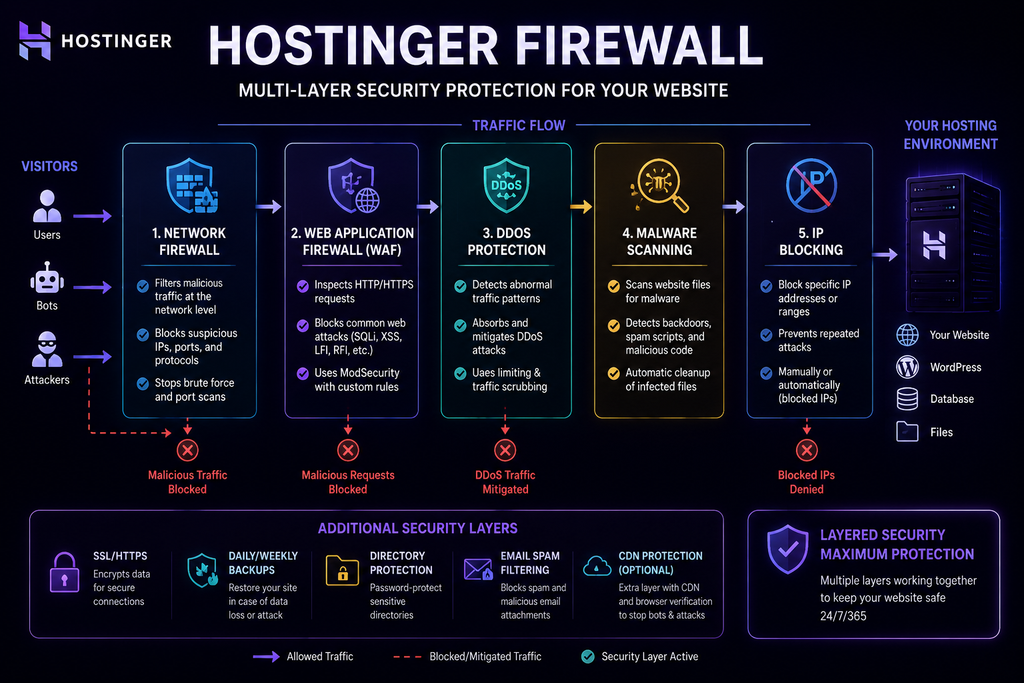
Hostinger describes its website-security architecture as a combination of infrastructure and website protections. Its current security documentation says its hosting environment uses firewall and DDoS protection, malware protection, backups, WordPress security enhancements and other security measures. Hostinger also says its web and cloud hosting uses advanced hardware firewalls and additional protections against DDoS risks by default.
So when people search for “Hostinger Firewall,” it is more accurate to think of it as:
Hostinger’s built-in firewall and website-security layers
rather than a single downloadable security product.
What Does Hostinger Firewall Protect Against?
A firewall helps control potentially harmful network or web traffic before it can cause damage.
A Web Application Firewall (WAF) works at the HTTP/application layer. It examines web requests and can identify and block common attack patterns such as SQL injection and cross-site scripting. Cloudflare’s technical documentation provides a useful general explanation of how WAFs filter web traffic between applications and the Internet.
Hostinger says it uses a web application firewall and DDoS traffic filtering as part of its website security infrastructure.
Depending on the layer involved, security controls can help defend against threats such as:
- Malicious HTTP requests
- SQL injection attempts
- Cross-site scripting attempts
- Automated malicious traffic
- Brute-force activity
- Suspicious network traffic
- DDoS attacks
- Malware and compromised website files
However, no firewall should be treated as a complete replacement for secure passwords, software updates, backups, account security and application-level protection.
Hostinger Firewall vs WAF: What’s the Difference?
These terms are often mixed together.
Firewall
A firewall controls or filters network traffic according to security rules.
Web Application Firewall (WAF)
A WAF specifically examines web application traffic and can block malicious HTTP requests.
DDoS protection
DDoS protection is designed to identify and mitigate abusive traffic intended to overwhelm a network, server or application.
Malware scanner
A malware scanner looks for malicious or compromised files after they exist on the hosting environment.
These tools solve different problems.
A website can therefore benefit from multiple security layers rather than relying on one security feature.
Hostinger currently says its web and cloud infrastructure uses both hardware firewalls and other security mechanisms to reduce DDoS risk, while its security documentation also describes a WAF and DDoS traffic filter.
How Hostinger’s Website Security Works
A simplified model looks like this:
Visitor request
↓
Network / infrastructure filtering
↓
DDoS and traffic protection
↓
Web application firewall
↓
Hosting environment
↓
Website / WordPress / application
And separately:
Website files
↓
Malware scanning
↓
Detection and cleanup of supported malicious files
This layered approach matters because a single security tool cannot address every type of attack.
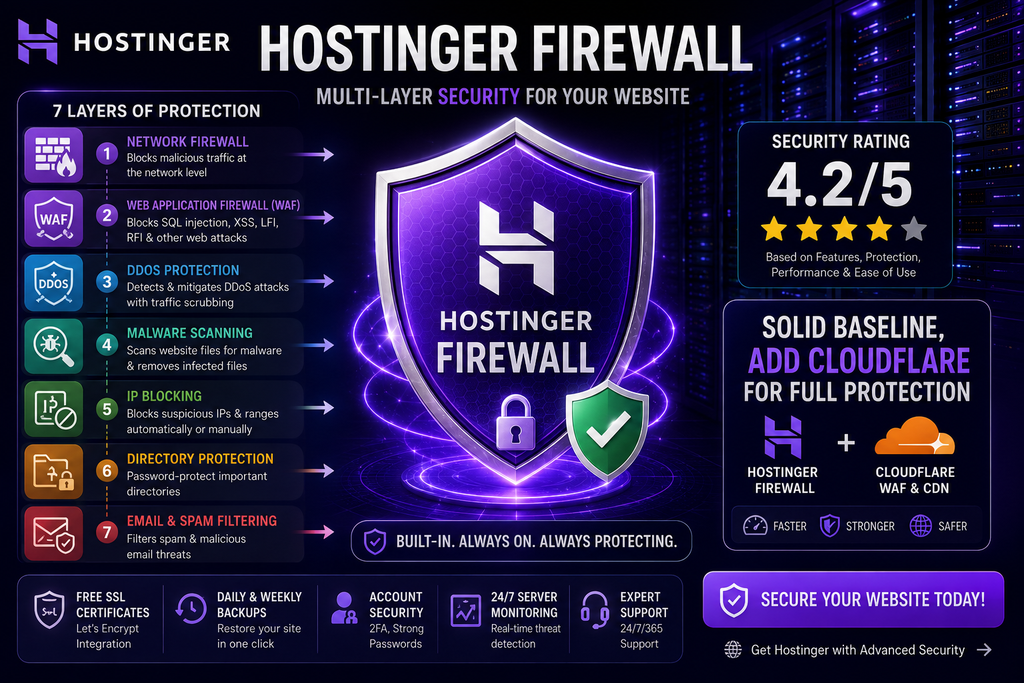
Hostinger’s Main Security Layers
1. Web Application Firewall
Hostinger says it uses an in-house Web Application Firewall as part of its hosting technology stack. Its technology page also lists ModSecurity among the security technologies used on its hosting platform.
A WAF is designed to inspect web requests and help block malicious application traffic.
Typical threats a WAF can help detect include:
- SQL injection
- Cross-site scripting
- File inclusion
- Suspicious HTTP requests
- Exploit patterns
- Malicious automated traffic
The exact rules and controls can change over time, so an evergreen article should avoid promising that every attack type will always be blocked.
2. ModSecurity
ModSecurity is an open-source web application firewall engine commonly used to inspect HTTP traffic.
Hostinger’s current support documentation says ModSecurity is enabled by default on its relevant web and cloud hosting environments and recommends keeping it enabled unless it causes a compatibility problem with a script, plugin or widget.
This is an important distinction from the original article.
Rather than writing:
“Hostinger Firewall = ModSecurity”
it’s more accurate to explain that ModSecurity is one component of the broader web-security stack.
When should you disable ModSecurity?
Normally, you shouldn’t.
If a legitimate application suddenly stops working after a rule is triggered, troubleshooting may require temporarily disabling or adjusting the protection.
Hostinger itself recommends keeping ModSecurity enabled unless a compatibility issue requires otherwise.
3. DDoS Protection
A Distributed Denial-of-Service (DDoS) attack attempts to overwhelm a network, server or application with unwanted traffic.
Hostinger says its web and cloud hosting servers use advanced hardware firewalls and other security measures to reduce DDoS risks by default. It also describes traffic filtering that identifies malicious traffic before it reaches its services.
For Business web hosting and higher cloud plans, Hostinger says its in-house CDN provides an additional layer of protection against botnet attacks.
Hostinger’s current CDN documentation also explains that browser verification can help protect sites against DDoS attacks, scrapers and malicious bots.
Does this mean your website is immune to DDoS?
No.
No security provider can honestly promise that a website is impossible to disrupt.
A better statement is:
Hostinger provides infrastructure-level DDoS protection designed to detect and mitigate malicious traffic, with additional capabilities available through its CDN and higher-tier services.
4. Malware Scanner
Hostinger provides a Malware Scanner through hPanel for web and cloud hosting.
Hostinger says the scanner automatically checks website files for malicious or compromised content and can identify affected files and the action taken.
This can help with:
- Malicious files
- Backdoors
- Suspicious scripts
- Compromised files
- Malware-related redirects
- Other file-level infections
Important limitation
This is one of the most important security details to understand.
Hostinger’s documentation explicitly says the Malware Scanner does not scan or clean the database. A database-level infection can therefore remain even when a file scan appears clean.
For WordPress, database infections can affect areas such as:
wp_optionswp_postswp_users
If malicious content keeps returning after file cleanup, database-level investigation may be necessary.
That is a much more useful warning for readers than simply saying:
“Hostinger scans for malware.”
5. IP Blocking
Hostinger also uses automated security systems that can flag suspicious IP addresses.
Its support documentation explains that an IP may be blocked after suspicious activity such as repeated failed login attempts or unusually high request volumes.
This can sometimes affect legitimate visitors as well.
Symptoms of an IP block can include:
- Your website suddenly becomes inaccessible
- WordPress admin stops loading
- hPanel access fails
- File Manager becomes inaccessible
- SSH access fails on VPS
If this happens, check whether your IP has been blocked before assuming the entire website is down.
6. Cloudflare and CDN Protection
Hostinger supports CDN-based protection on eligible plans.
A CDN places an additional layer between visitors and the origin server.
That can provide benefits such as:
- Caching
- Traffic filtering
- DDoS mitigation
- Bot protection
- Lower origin-server load
Hostinger says its CDN includes browser verification designed to challenge certain automated or suspicious clients.
Cloudflare also explains that a CDN can reduce the number of requests reaching the origin server and that a WAF can filter malicious web traffic before it reaches the application.
Hostinger + Cloudflare: Do you need both?
Not every website needs every possible security product.
For a small website, Hostinger’s built-in protection plus secure WordPress configuration may be enough.
For a higher-risk or higher-traffic site, adding a CDN/WAF such as Cloudflare can create another layer between the public Internet and the origin.
7. SSL and HTTPS
A secure website should use HTTPS.
Hostinger includes SSL certificates as part of its hosting security offering and integrates with Let’s Encrypt. Its technology documentation lists Let’s Encrypt integration and unlimited free SSL certificates among its platform capabilities.
SSL does not replace a firewall.
Instead:
SSL protects data in transit.
A firewall filters traffic.
A malware scanner detects malicious files.
Backups help with recovery.
These controls complement one another.
8. Backups Are Part of Security
Security is not only about stopping attacks.
It is also about recovering after something goes wrong.
Hostinger describes regular backups as part of its broader data-integrity and security practices.
A useful backup strategy gives you a way to restore a website after:
- Malware infection
- Accidental deletion
- Plugin failure
- Application errors
- Bad configuration changes
- Data corruption
For important websites, an independent off-site backup can provide another recovery option.
Does Hostinger Firewall Protect WordPress?
Yes, but there is an important distinction.
Hostinger’s infrastructure-level security protects the hosting environment.
WordPress itself is an application with its own attack surface.
A WordPress site can still be compromised through:
- Vulnerable plugins
- Vulnerable themes
- Outdated WordPress core
- Weak administrator passwords
- Stolen credentials
- Malicious extensions
- Poor access controls
- Insecure custom code
That is why infrastructure protection should not be treated as a replacement for WordPress security.
Hostinger Firewall vs Wordfence
For WordPress users, Wordfence is one of the most relevant comparisons.
Wordfence describes its free product as an endpoint firewall and malware scanner designed specifically for WordPress. It also includes 2FA, brute-force protection, vulnerability alerts and other WordPress-focused security features.
That makes the two technologies complementary rather than identical.
| Security Layer | Hostinger | Wordfence |
|---|---|---|
| Infrastructure protection | Yes | No |
| Hosting/network firewall | Yes | No |
| Web application protection | Yes | Yes |
| WordPress-specific rules | Limited compared with a dedicated WP plugin | Yes |
| Malware scanning | Yes | Yes |
| WordPress vulnerability monitoring | Not its primary role | Yes |
| 2FA | Account/platform security options | Yes |
| Brute-force protection | Infrastructure-level controls | Yes |
| Website-specific security controls | Hosting level | WordPress level |
Wordfence’s documentation says its endpoint firewall can block attacks targeting WordPress-specific vulnerabilities, malicious uploads and brute-force login attempts.
Which one should you use?
For WordPress, a layered model often makes more sense than choosing one or the other.
Hostinger security
+
WordPress hardening
+
Optional Wordfence
+
Optional CDN/WAF
The exact combination should depend on the website’s risk level.
Hostinger Firewall vs Cloudflare
Cloudflare operates differently from a hosting-level security system.
Cloudflare’s WAF is positioned between the Internet and the application and filters web traffic before it reaches the origin.
Its DDoS platform provides protection across network and application layers and is designed to automatically detect and mitigate DDoS traffic.
| Feature | Hostinger security | Cloudflare |
|---|---|---|
| Hosting-level protection | Yes | No |
| Network/infrastructure defenses | Yes | Yes |
| WAF | Yes | Yes |
| CDN | Available through eligible Hostinger services | Core product |
| DDoS mitigation | Yes | Yes |
| WordPress-specific security | Limited | Not WordPress-specific |
| Origin shielding | Hosting dependent | Yes when correctly configured |
The key difference
Hostinger protects the hosting environment.
Cloudflare can sit in front of the hosting environment.
This is why the two can work together.
Cloudflare itself recommends protecting the origin so attackers cannot simply bypass the security layer and connect directly to the origin server.
Is Hostinger Firewall Enough for a Small Website?
For many personal websites, blogs and small business sites, Hostinger’s built-in security can provide a strong baseline.
Hostinger already provides multiple infrastructure and website-security measures rather than requiring every customer to build a security stack from scratch.
But “enough” depends on what your site does.
A basic blog
Hostinger security + HTTPS + updates + backups may be a reasonable baseline.
WordPress business website
Add strong account security, plugin/theme updates, backups and consider Wordfence or another WordPress security layer.
Ecommerce
Use stronger monitoring, backups, application security and a carefully designed CDN/WAF strategy.
High-risk application
Consider a dedicated security architecture rather than relying solely on shared hosting protections.
How to Secure a Hostinger Website Properly
A firewall is only one part of website security.
Use a layered approach.
1. Keep WordPress Updated
Install updates for:
- WordPress core
- Plugins
- Themes
- PHP
- Other application dependencies
Outdated software is one of the biggest avoidable attack surfaces.
2. Use Strong Administrator Credentials
Avoid predictable passwords.
Use:
- Long unique passwords
- A password manager
- Separate credentials for important accounts
- Multi-factor authentication where available
3. Enable Two-Factor Authentication
Add 2FA to important administrator accounts.
This creates a second barrier even if a password is stolen.
Wordfence also includes 2FA as part of its WordPress security tools.
4. Keep Backups
Maintain reliable backups and know how to restore them.
A backup that has never been tested is not the same as a proven recovery system.
5. Monitor Your Website
Watch for:
- Unexpected redirects
- New administrator accounts
- Unknown files
- Traffic spikes
- Unexpected scripts
- Search-engine spam
- Browser security warnings
Early detection makes cleanup easier.
6. Remove Unused Plugins and Themes
Every unnecessary extension creates another possible attack surface.
Delete what you do not need.
7. Use HTTPS
Keep your website accessible through HTTPS and avoid exposing sensitive data through unsecured connections.
8. Consider an Additional WAF/CDN
A CDN/WAF can add another layer of traffic filtering and DDoS mitigation.
Cloudflare documents how a WAF and CDN can reduce malicious traffic reaching the origin.
What to Do If Your Hostinger Website Gets Hacked
If your website appears compromised, don’t simply reinstall everything immediately.
Start by determining what changed.
Step 1: Isolate the problem
Check whether:
- The entire website is affected
- Only WordPress is affected
- Only the database is affected
- A specific plugin is responsible
Step 2: Use Hostinger’s Malware Scanner
Hostinger’s Malware Scanner can identify and clean supported malicious website files.
Step 3: Check the database
This is especially important for WordPress because Hostinger notes that its scanner does not scan or clean the database.
Step 4: Review administrator accounts
Remove accounts you don’t recognize.
Step 5: Change passwords
Change:
- Hosting password
- WordPress administrator passwords
- Database credentials
- FTP/SFTP credentials
- Email credentials where appropriate
Step 6: Update everything
Patch WordPress, plugins, themes and the server-side software where you have control.
Step 7: Restore from a known-clean backup
If the infection is extensive, restoration may be safer than attempting to clean every compromised file manually.
What Hostinger Malware Scanner Cannot Do
This deserves its own section because it is easy to misunderstand.
Hostinger says its Malware Scanner:
- Scans website files
- Identifies compromised or malicious files
- Can clean supported file-based infections
But it also states that:
The database is not scanned or cleaned by the Malware Scanner.
Therefore:
A clean file scan does not automatically prove that the entire website is clean.
This is especially relevant for WordPress websites where malicious content can be injected into database tables.
Does Hostinger Firewall Stop All Hackers?
No.
No firewall can guarantee complete protection.
A firewall is designed to reduce malicious traffic and block known or suspicious attack patterns.
It cannot make a website invulnerable.
An attacker could still exploit:
- A newly discovered vulnerability
- A weak password
- A compromised administrator
- An insecure plugin
- A vulnerable custom application
- Stolen credentials
- A misconfigured server
- A supply-chain compromise
That’s why good security uses defense in depth.
A Better Security Stack for WordPress
For a typical WordPress website, a practical layered setup can look like:
Hostinger infrastructure protection
↓
HTTPS / SSL
↓
Hostinger WAF and traffic filtering
↓
CDN/WAF when appropriate
↓
WordPress security plugin when justified
↓
Strong passwords + 2FA
↓
Updates and vulnerability management
↓
Backups
↓
Monitoring
No individual layer should be expected to do everything.
Hostinger Firewall Pros and Cons
Advantages
Built into the hosting environment
You don’t have to install a separate network firewall simply to get baseline infrastructure protection.
Multiple security layers
Hostinger combines firewall, DDoS and malware-related protections rather than depending on one mechanism.
ModSecurity support
Hostinger says ModSecurity is enabled by default in relevant environments.
Malware scanning
Hostinger provides a built-in Malware Scanner through hPanel for supported web and cloud hosting services.
CDN security options
Eligible Hostinger services can add CDN-based protection against bots and DDoS activity.
Limitations
Not a complete security system
A firewall cannot replace secure WordPress administration, updates or backups.
Features differ by service
Security tools and controls are not identical across web hosting, cloud hosting and VPS products.
Malware scanning has limitations
Hostinger explicitly states that its Malware Scanner does not scan or clean the database.
Advanced protection may require additional layers
Higher-risk websites may benefit from a dedicated WAF/CDN, WordPress security plugin or specialist security service.
Hostinger Firewall: Frequently Asked Questions
What is Hostinger Firewall?
“Hostinger Firewall” is best understood as the collection of firewall and traffic-security mechanisms protecting Hostinger-hosted websites and infrastructure. These include a WAF, DDoS protection and other network/security controls.
Is Hostinger Firewall free?
Hostinger includes security protections as part of its hosting services, although the exact security features depend on the product and plan.
Is ModSecurity enabled by default?
Hostinger’s current support documentation says ModSecurity is enabled by default in applicable web and cloud hosting environments.
Does Hostinger protect against DDoS attacks?
Yes. Hostinger says its web and cloud hosting environments use hardware firewalls and other measures to mitigate DDoS risks, with additional CDN-based protection available for eligible plans.
Does Hostinger scan for malware?
Yes. Hostinger provides a Malware Scanner through hPanel for its web and cloud hosting services.
Does Hostinger Malware Scanner remove malware?
Hostinger says the scanner can clean supported malicious website files. However, it does not scan or clean the database.
Does Hostinger Firewall replace Wordfence?
Not necessarily.
Hostinger provides infrastructure-level protection, while Wordfence adds WordPress-specific firewall, malware scanning and login-security capabilities.
Does Hostinger Firewall work with Cloudflare?
Yes. They can operate at different layers, with Cloudflare positioned in front of the origin and Hostinger providing protections inside the hosting environment.
Cloudflare recommends ensuring the origin cannot simply be bypassed when using a proxy/WAF architecture.
Can Hostinger block an IP address?
Hostinger uses automated firewall systems that can block suspicious IPs, and its support documentation provides troubleshooting guidance for blocked IP addresses.
Is Hostinger secure enough for WordPress?
For many ordinary WordPress sites, Hostinger provides a useful security baseline. But WordPress security should also include updates, strong authentication, backups and appropriate application-level protection.
Is Hostinger secure enough for ecommerce?
It can be part of a secure ecommerce setup, but ecommerce sites have higher security and recovery requirements. Consider stronger monitoring, tested backups, application security and an appropriate WAF/CDN architecture.
Hostinger Firewall vs Cloudflare vs Wordfence: Which Should You Use?
There isn’t one universal winner because these tools operate at different layers.
Choose Hostinger’s built-in security when:
You want baseline protection without managing a complicated security stack.
Add Cloudflare when:
You want an additional Internet-facing layer for CDN, WAF and DDoS protection.
Add Wordfence when:
You run WordPress and want WordPress-specific firewall, malware, login and vulnerability protection. Wordfence Free currently includes an endpoint firewall, malware scanner, 2FA and other WordPress-specific protections.
Use multiple layers when:
Your website is important enough that a single security control is not sufficient.
My Recommended Hostinger Security Setup
For a personal blog
Hostinger security + SSL + strong password + updates + backups
For an affiliate website
Hostinger security + SSL + updates + backups + 2FA + optional WordPress security plugin
For a business website
Hostinger security + CDN/WAF + 2FA + frequent backups + monitoring
For ecommerce
Hostinger security + CDN/WAF + WordPress/application security + tested backups + monitoring + strong account controls
For high-risk applications
Use a security architecture designed specifically for the application, threat model and regulatory requirements rather than relying on generic hosting protection.
How to Monitor Your Hostinger Website for Attacks
Security is easier when you know what “normal” looks like.
Watch for sudden changes in:
- Traffic
- Server resources
- Login attempts
- Failed requests
- Unknown files
- Admin accounts
- Redirects
- Search-engine indexing
- Email activity
- Website performance
Hostinger’s hosting dashboard provides access to website safety information and malware-scan results, while logs can help with troubleshooting suspicious requests.
A Note About Security Testing
The earlier version of this article claimed a 60-day test with exact counts of blocked brute-force attempts, SQL injection requests, XSS attempts, malicious bots and DDoS events.
Those numbers should only remain in the article if you have the underlying logs, methodology and screenshots to prove them.
For an evergreen page, unsupported testing claims are worse than having no test at all.
A much stronger future update would document:
Test environment → attack simulation → measurement method → screenshots → raw observations → limitations
That turns the article into genuine original research.
Google’s current guidance explicitly encourages original research, analysis and first-hand experience, and says people-first content should provide substantial value rather than merely summarizing other sources.
Final Verdict: Is Hostinger Firewall Good Enough?
Hostinger provides a solid baseline of website and infrastructure security, but it should not be treated as a complete security strategy by itself.
Its current security architecture includes protections such as a web application firewall, DDoS mitigation, hardware/network defenses, malware scanning and other hosting-security mechanisms.
For a normal blog or small website, that baseline may be sufficient when combined with:
HTTPS + strong passwords + updates + backups + account security
For WordPress, additional application-level protection can make sense.
For higher-risk websites, adding a CDN/WAF, stronger monitoring and more rigorous recovery procedures can provide another layer.
My overall assessment
Hostinger built-in security: ★★★★☆
Ease of use: ★★★★★
Baseline protection: ★★★★☆
WordPress-specific protection: ★★★☆☆
High-security environments: ★★★☆☆
The biggest lesson is simple:
Don’t ask whether one firewall can secure your website. Build several independent layers so that one failure doesn’t become a complete compromise.
Frequently Used Security Terms
Firewall
Controls traffic according to security rules.
WAF
Filters web requests to protect applications from malicious HTTP traffic.
DDoS
An attack that attempts to overwhelm a service with unwanted traffic.
Malware
Malicious software or code that can compromise a system or website.
ModSecurity
An open-source web application firewall engine.
CDN
A distributed network that can cache content and provide an additional traffic/security layer.
2FA
Two-factor authentication adds another verification step beyond a password.
Backup
A recoverable copy of website data.
Sources & Research Method
This article is based primarily on Hostinger’s current documentation covering:
- Hosting security
- Firewall and WAF protection
- DDoS protection
- ModSecurity
- Malware Scanner
- Blocked IP troubleshooting
- Hosting dashboard security controls
External explanations of WAF and DDoS architecture were cross-checked against Cloudflare documentation, while WordPress-specific security capabilities were checked against Wordfence’s current documentation.
This article should be refreshed when Hostinger materially changes its security products, dashboard locations, hosting tiers or malware-scanning capabilities.
Affiliate Disclosure
This article may contain affiliate links. If you purchase a product or service through one of these links, we may receive a commission at no additional cost to you.
Our goal is to provide useful, independently researched information and help readers understand what Hostinger’s security features can—and cannot—do.