
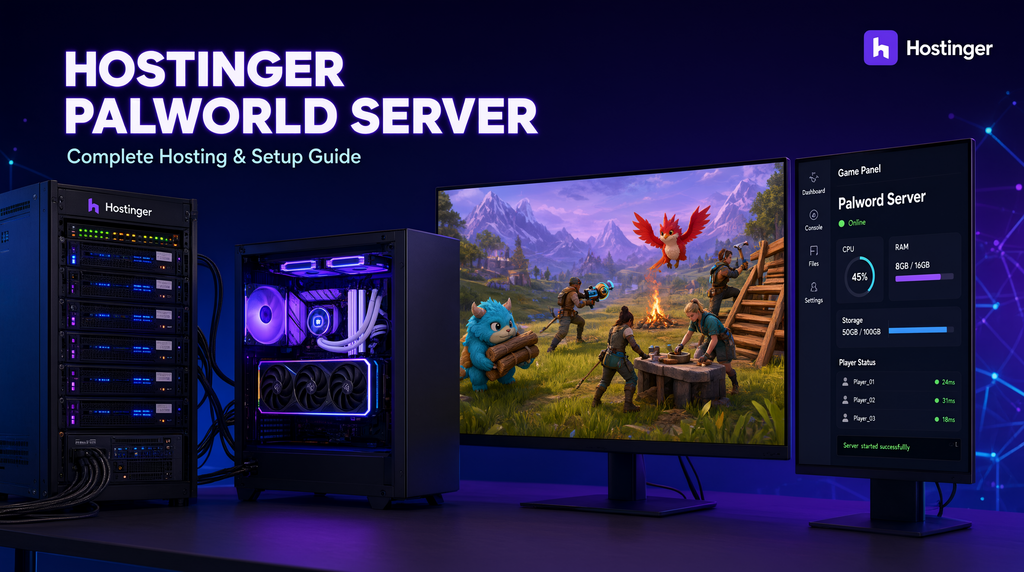
Hostinger Palworld Server: Complete Guide to Hosting, Setup, Requirements & Performance
Last updated: August 27, 2026
Author: Rabindra — 7+ years of web hosting and server experience
Quick answer: Hostinger offers dedicated Palworld server hosting through VPS plans with its Game Panel, which makes setup considerably easier than a traditional manual Linux installation. For a small group, the 8 GB Game Panel 2 plan is the entry point; Hostinger currently recommends Game Panel 4 with 16 GB RAM for Palworld servers of up to 32 players.
Check Hostinger Palworld Server Plans →
Looking for a Hostinger Palworld Server?
Running a Palworld world from your own gaming PC is fine when you’re playing casually with a few friends. It becomes much less convenient when you want a world that stays online while you’re away, a server that other players can join independently, or more control over the way the game is configured.
That’s where a dedicated Palworld server makes sense.
Instead of using your home PC as both a gaming machine and a server, you rent server resources in a data center and run the Palworld dedicated server there.
The practical benefits are straightforward:
- Your gaming PC doesn’t need to stay online.
- Friends can connect to a persistent world.
- You have more control over server settings.
- You can choose server hardware based on your player count.
- You can add supported modifications and customize gameplay.
- You can move to a larger server as your community grows.
Hostinger now offers a dedicated Palworld hosting product with a Game Panel, so you don’t necessarily need to spend your first evening typing Linux commands. Hostinger says its Game Panel lets you create a Palworld instance without using Linux commands, while advanced users can still manage the server manually through SSH and root access.
Our recommendation in one sentence
Choose Game Panel 2 for a small private group, and look at Game Panel 4 if you’re planning a larger world, mods or up to 32 players.
See the current Hostinger Palworld offer →
What Is a Palworld Dedicated Server?
A Palworld dedicated server is a separate server instance that runs the multiplayer game world independently of an individual player’s local game session.
That means the server can continue running when the person who originally created the world is offline.
This is different from ordinary co-op hosting.
Co-op hosting
One player effectively hosts the session.
Dedicated server
The world runs independently on a server.
That distinction becomes important when a group wants a persistent world.
You can think of it like this:
Your PC hosting a session
→ You’re playing
→ Friends join
→ You disconnect
→ Session ends
versus:
Dedicated server
→ Server stays online
→ You play
→ Friends play
→ You leave
→ World continues running
For communities, long-running survival worlds and groups that don’t always play at the same time, the second approach is usually much more convenient.
Why Use Hostinger for a Palworld Server?
Hostinger is better known for web hosting, but its current VPS and dedicated game-server products are also designed for game-server workloads.
Its Palworld hosting platform currently includes:
- Game Panel
- AMD EPYC processors
- NVMe storage
- Full root access
- DDoS protection
- Automatic weekly backups
- Dedicated IP
- Mod support
- One-click updates
- Multiple server locations
- AI-assisted server management
The biggest change compared with older Hostinger Palworld guides is the Game Panel.
Hostinger now offers a Palworld-specific hosting workflow where you can create an instance from the panel instead of performing the entire installation manually.
That makes the service relevant to two very different audiences:
Beginners: use Game Panel.
Advanced users: use SSH, SteamCMD and full root access.
Hostinger Palworld Server Plans
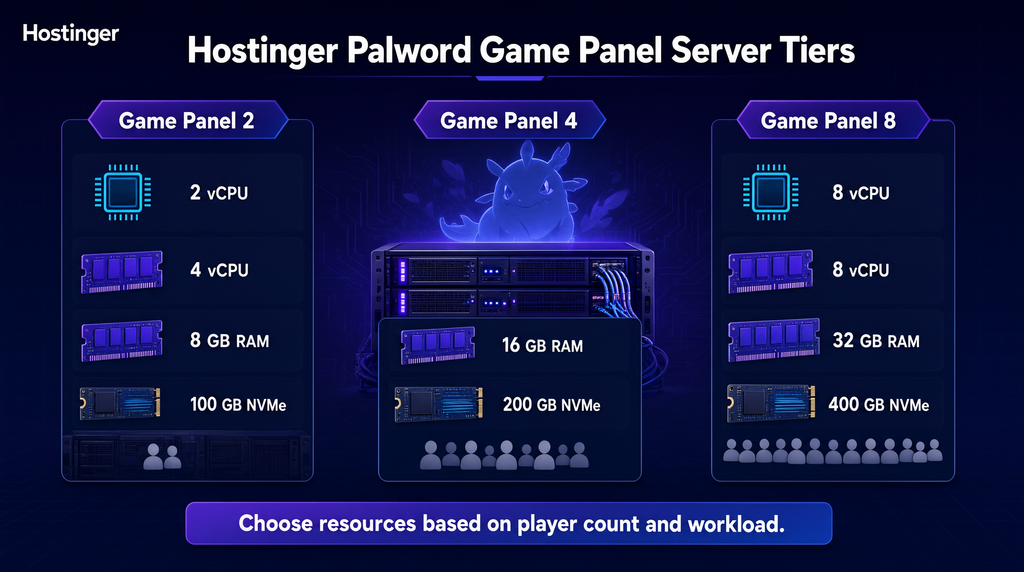
Hostinger currently offers three main Palworld Game Panel plans on its regional pages.
| Plan | CPU | RAM | NVMe Storage | Typical Use |
|---|---|---|---|---|
| Game Panel 2 | 2 vCPU | 8 GB | 100 GB | Small private server |
| Game Panel 4 | 4 vCPU | 16 GB | 200 GB | Larger groups / up to 32 players |
| Game Panel 8 | 8 vCPU | 32 GB | 400 GB | Large or resource-heavy server |
Hostinger currently recommends Game Panel 2 for smaller groups and says Game Panel 4 is suitable for Palworld servers with up to 32 players.
Current U.S. pricing
Hostinger’s current U.S. Palworld page displays:
- Game Panel 2: $9.49/month promotional equivalent
- Game Panel 4: $13.99/month promotional equivalent
- Game Panel 8: $27.99/month promotional equivalent
The current U.S. page states these prices are based on a 24-month prepaid term and lists separate renewal rates.
Current U.K. pricing
The U.K. page currently displays:
- Game Panel 2: £7.49/month
- Game Panel 4: £10.99/month
- Game Panel 8: £20.99/month
with higher renewal pricing after the promotional term.
Current Canadian pricing
The Canadian page currently displays:
- Game Panel 2: CA$13.29/month
- Game Panel 4: CA$19.59/month
- Game Panel 8: CA$39.09/month
Current Australian pricing
The Australian page currently displays:
- Game Panel 2: A$13.79/month
- Game Panel 4: A$20.29/month
- Game Panel 8: A$40.49/month
Pricing note: Hosting promotions change. Treat these figures as a current snapshot, not a permanent price guarantee. For an evergreen article, update only this pricing section when Hostinger changes its offer.
Which Hostinger Palworld Plan Should You Buy?
This is more important than simply finding the cheapest VPS.
Game Panel 2 — Best for Small Groups
Game Panel 2 currently provides:
- 2 vCPU cores
- 8 GB RAM
- 100 GB NVMe storage
- 8 TB bandwidth
- Dedicated IP
- DDoS protection
- Game Panel
- Mod support
It’s the obvious starting point for a private server with a relatively small number of players.
Choose it when:
- You’re playing with friends
- You don’t expect a large community
- You want to keep the cost down
- You’re not running an unusually demanding setup
Game Panel 4 — Best Overall Choice
Game Panel 4 provides:
- 4 vCPU cores
- 16 GB RAM
- 200 GB NVMe storage
- 16 TB bandwidth
- Dedicated IP
- Mod support
- Full root access
Hostinger specifically says Game Panel 4 is suitable for Palworld servers with up to 32 players.
Choose it when:
- You expect more players
- You’re planning mods
- You want additional RAM headroom
- You’re running a more active community
- You want a safer margin than an 8 GB server
My pick
Game Panel 4 is the plan I’d choose for a serious private community.
It gives you substantially more memory and CPU than Game Panel 2 without jumping all the way to the largest plan.
Game Panel 8 — For Larger Workloads
Game Panel 8 increases the resources to:
- 8 vCPU cores
- 32 GB RAM
- 400 GB NVMe storage
- 32 TB bandwidth
This is more appropriate when the server workload is substantial or when you want considerable headroom for additional requirements.
Don’t buy it simply because it is the biggest plan.
Buy resources based on the actual workload.
Palworld Dedicated Server Requirements
This is one area where old blog posts often cause confusion.
Palworld’s official server documentation lists the following operating requirements:
| Requirement | Official guidance |
|---|---|
| CPU | 4 cores recommended |
| Memory | 16 GB |
| Storage | Fast SSD recommended |
| Network | UDP port 8211 by default |
| OS | 64-bit Windows or Linux |
Palworld’s documentation also notes that 8 GB can boot a server but increases the possibility of crashes caused by running out of memory, while 16 GB is the recommended memory level.
That gives us a much more useful rule than saying:
“8 GB = exactly 8 players.”
There is no universal player-to-RAM formula that applies to every server configuration.
Actual resource requirements can vary with:
- Player count
- World activity
- Server settings
- Mods
- Server version
- Save size
- CPU workload
- Operating system
- Background processes
Practical recommendation
8 GB: reasonable starting point for a smaller private group.
16 GB: the safer choice for a larger group and Hostinger’s recommended 32-player configuration.
32 GB: useful when you need additional headroom.
Hostinger’s own Palworld page currently positions Game Panel 2 for smaller groups and Game Panel 4 for up to 32 players.
Does Palworld Need a Lot of RAM?
Yes, memory is important.
The official Palworld server requirements recommend 16 GB RAM and warn that an 8 GB environment is more prone to out-of-memory crashes.
This is why I would not recommend blindly choosing the smallest server because it is cheaper.
A server that is constantly running low on RAM can lead to:
- Crashes
- Poor stability
- Slowdowns
- Failed updates
- Difficulty running mods
RAM isn’t the only factor, but it’s one of the first specifications I would examine.
How Many Players Can a Hostinger Palworld Server Handle?
Hostinger currently says:
- Game Panel 2: suitable for smaller groups
- Game Panel 4: suitable for up to 32 players
- Game Panel 8: designed for larger/resource-heavy use
However, you should treat player counts as planning guidance, not a physics law.
A server supporting 16 lightly active players may behave differently from a server supporting 16 highly active players with additional modifications and heavy world activity.
Your configuration matters.
Is Hostinger Palworld Hosting Available for Steam and Xbox?
Hostinger’s current Palworld hosting page says dedicated servers are available for the Steam version.
Palworld’s own server documentation also provides platform-specific configuration instructions, including documentation for Xbox connections in supported dedicated-server configurations.
Because platform compatibility can change with game and server releases, check the current Hostinger and Palworld documentation before buying specifically for cross-platform play.
Important
Do not assume:
“Dedicated server” = “every Palworld platform can automatically connect.”
Verify the platform combination you actually need.
How to Create a Palworld Server on Hostinger
There are now two approaches.
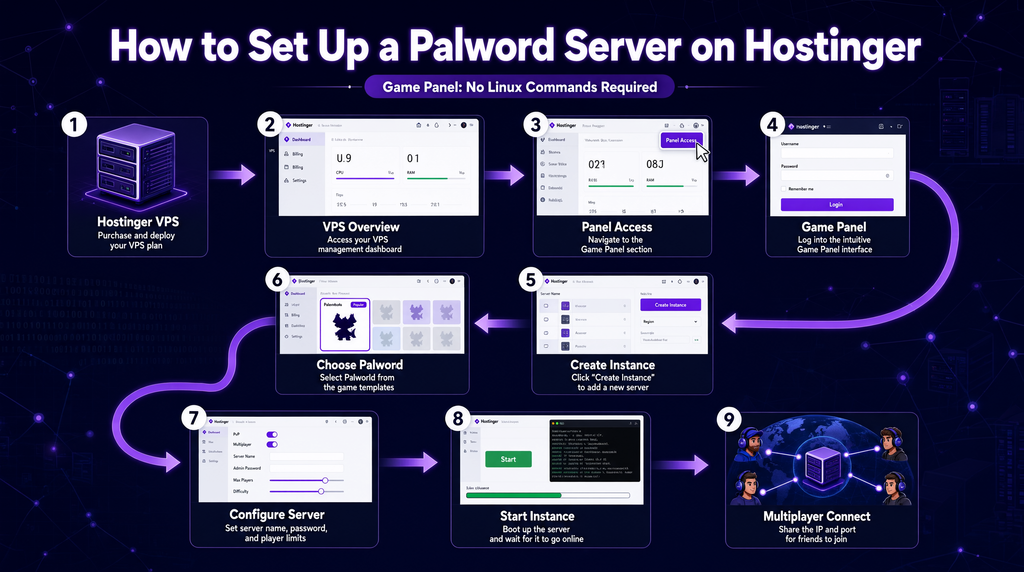
Method 1 — Game Panel
This is the easiest option.
Hostinger’s current instructions are:
VPS Overview → Panel Access → Login URL → Create Instance → Palworld
After the Palworld instance is created, you can configure the server through the game-management panel. Hostinger says this method requires no Linux commands.
Step-by-step
Step 1: Purchase a Game Panel plan
Choose the plan based on your expected workload.
View Hostinger Palworld hosting →
Step 2: Open your VPS
Go to the VPS overview in hPanel.
Step 3: Open Panel Access
Hostinger’s current workflow provides a login URL for the Game Panel.
Step 4: Sign in
Enter the Game Panel credentials.
Step 5: Create an instance
Select:
Create Instance → Palworld
Step 6: Wait for installation
The panel creates the server environment.
Step 7: Configure your world
Adjust the available Palworld settings according to your preferred gameplay.
Step 8: Start the server
Once the instance is ready, start it from the Game Panel.
This is the route I recommend for most users.
Method 2 — Manual Palworld Server Installation
Advanced users may prefer manual installation.
Hostinger’s current Palworld tutorial documents the manual approach using a Linux VPS, SSH and SteamCMD. It currently demonstrates Debian 12 rather than the Ubuntu 22.04 workflow used in many older tutorials.
This is important because many existing articles online still publish old installation commands.
The general process
VPS
↓
Linux
↓
SSH
↓
SteamCMD
↓
Palworld Dedicated Server
↓
Firewall
↓
Configuration
↓
Start server
Installing the Palworld Dedicated Server with SteamCMD
Palworld’s official documentation supports Linux deployment through SteamCMD.
The dedicated-server application is distributed through Steam’s infrastructure, and the Palworld documentation provides the SteamCMD installation command using App ID 2394010.
For advanced users, this provides considerably more control than a hosted panel.
However, it also creates more opportunities for configuration mistakes.
Use manual installation when:
- You are comfortable with Linux
- You need custom automation
- You want full control over startup scripts
- You want to manage the server from the command line
- You’re comfortable troubleshooting permissions and networking
Use Game Panel when:
- You’re new to VPS hosting
- You don’t want to manage Linux manually
- You want the fastest setup
- You want a graphical game-server management interface
Palworld Server Port
The default Palworld dedicated-server port is:
8211
Palworld’s current official server documentation identifies UDP 8211 as the default port and notes that it can be changed.
For manual Linux setups, you’ll need to configure the appropriate firewall and network rules.
Hostinger’s current manual setup tutorial demonstrates allowing both TCP and UDP for 8211 with UFW, while warning users to ensure SSH remains accessible before enabling UFW.
Security warning
Don’t blindly enable a firewall without first making sure your SSH port is allowed.
Otherwise, you can lock yourself out of your own VPS.
How to Configure a Palworld Server
Once your server is running, the next step is configuration.
Typical settings include:
- Server name
- Server description
- Password
- Admin credentials
- Player capacity
- Gameplay settings
- Spawn settings
- Day/night cycle
- Experience rate
- Resource settings
- Difficulty settings
The exact configuration options can change between Palworld releases, so I recommend using the configuration options exposed by the current server version instead of copying a decade-old settings file from an unrelated guide.
Hostinger specifically highlights customization of settings such as spawn rates, day-night cycles and difficulty.
How to Choose a Hostinger Server Location
Location matters because distance affects latency.
The general rule is:
Place the server as close as practical to the majority of your players.
For example:
Mostly U.S. players
Choose the closest available North American location.
Mostly U.K. players
Choose the closest available European location.
Mostly Canadian players
Use the nearest suitable North American location.
Mostly Australian players
Choose the nearest suitable Asia-Pacific location offered at checkout.
Mixed international community
Look at where most active players are located rather than choosing a location based on where the server owner lives.
Hostinger says its Palworld hosting is available across Europe, Asia, South America and North America and recommends choosing the location closest to the Palworld community for better gameplay.
Don’t choose a location based only on the country name
The closest physical data center is usually more important than whether a provider advertises a familiar country.
Test actual latency whenever possible.
Is Hostinger Good for Palworld in the U.S., U.K., Canada and Australia?
Yes, Hostinger has localized Palworld hosting pages for several Tier-1 markets.
This is useful because pricing and currencies differ by country.
United States
Current advertised starting price:
$9.49/month for Game Panel 2
United Kingdom
Current advertised starting price:
£7.49/month for Game Panel 2
Canada
Current advertised starting price:
CA$13.29/month for Game Panel 2
Australia
Current advertised starting price:
A$13.79/month for Game Panel 2
Because Hostinger’s regional promotions change, readers should always verify their local checkout price.
Hostinger Palworld Server vs Self-Hosting
Self-hosting is appealing because the software itself doesn’t require paying a monthly game-hosting provider.
But the real cost isn’t necessarily zero.
You provide:
- Hardware
- Electricity
- Internet connection
- Upload bandwidth
- Port forwarding
- Firewall configuration
- DDoS considerations
- Maintenance
- Backups
- Updates
- Troubleshooting
With a rented VPS:
Hostinger handles the physical infrastructure and network environment.
You still manage the server software, especially because VPS hosting is self-managed.
Self-hosting makes sense when:
You already own suitable hardware and enjoy managing servers.
Hostinger makes sense when:
You want an always-on remote server without leaving your gaming PC powered on.
Hostinger Palworld Server vs Dedicated Game Hosting
Traditional game-hosting providers often focus entirely on games.
Their major advantage is simplicity.
A dedicated game host may offer:
- One-click installation
- Game-specific dashboards
- Automated updates
- Mod installers
- Game-focused support
Hostinger’s advantage is greater VPS flexibility.
Its current Palworld hosting includes:
- Full root access
- Game Panel
- Mod support
- AMD EPYC CPUs
- NVMe storage
- DDoS protection
- Dedicated IP
- Multiple server locations
- Ability to use the VPS for other workloads
Which should you choose?
Choose a game-specific host if you want the simplest possible experience and don’t care about broader VPS flexibility.
Choose Hostinger if you want a game panel plus the underlying VPS control and resources.
Can You Host Other Games on a Hostinger VPS?
Yes.
Hostinger’s game-server hosting is not limited to Palworld.
Its game-server platform is designed for multiple games, and the hosting service includes a game panel and mod support.
That means your investment in a larger VPS can potentially support other supported game-server workloads, provided the available CPU, RAM, storage and network resources are sufficient.
Don’t assume one VPS can run every game simultaneously at full capacity.
Resource usage still matters.
Does Hostinger Support Palworld Mods?
Hostinger’s current Palworld hosting plans advertise mod support.
This is one reason the larger plans become more attractive as your server evolves.
Mods can increase:
- Memory requirements
- CPU usage
- Storage requirements
- Update complexity
- Troubleshooting requirements
Before adding a large mod collection, make a backup.
If a new mod causes instability, you want an easy path back to a working state.
Hostinger Palworld Backups
Hostinger’s current Palworld offering includes automatic weekly backups.
For a long-running survival world, backups are extremely important.
Your world save may represent hundreds of hours of progress.
A sensible strategy is:
Automatic hosting backup
Manual save backup before major changes
Additional copy for valuable worlds
Before you:
- Install major mods
- Change server configuration
- Update aggressively
- Test experimental settings
- Change server software
create a recoverable backup.
How to Back Up Your Palworld World Manually
Advanced users can back up the save directory independently.
The exact path depends on the installation method and server environment.
The principle is:
Locate the Palworld save directory → stop the server → copy the save → store it separately
Do not assume a single path works for every Linux installation.
This is one area where a good evergreen guide should teach the principle instead of publishing one hard-coded directory as though it applies forever.
How to Update a Palworld Server
Updates can be performed through the Game Panel on Hostinger’s current game-server hosting product, which advertises one-click updates.
For a manual SteamCMD installation, advanced users can update the dedicated server by running SteamCMD and requesting the current Palworld server files.
Palworld’s official documentation supports the SteamCMD deployment method.
Safe update workflow
Backup
↓
Stop server
↓
Update server files
↓
Check configuration
↓
Start server
↓
Verify world
↓
Let players reconnect
This is safer than updating a live server blindly.
How to Keep a Palworld Server Running 24/7
A dedicated VPS is designed to remain available independently of your gaming PC.
With a manual Linux setup, you also need a reliable process manager or service configuration.
Older guides often use screen, which can work, but a proper service manager such as systemd is generally more suitable for production-style administration.
For beginners using Hostinger’s Game Panel, much of this process is handled by the game-server management layer.
That’s another reason the current Game Panel workflow is preferable to copying old manual tutorials.
How to Reduce Palworld Server Lag
“Lag” isn’t always caused by the server CPU.
Check the entire path:
Player connection
→ Internet route
→ Data center
→ Server network
→ Server CPU
→ Server RAM
→ Game simulation
→ Mods
→ Client machine
Start with these checks
1. Server location
Move closer to the majority of players if latency is consistently high.
2. RAM
Check for memory pressure.
3. CPU
Watch whether the server is CPU constrained.
4. Mods
Temporarily remove recently added modifications when troubleshooting.
5. Server settings
Heavy gameplay settings can increase workload.
6. Player connection
A player with poor Internet can experience problems even when the server itself is healthy.
How to Monitor Your Hostinger Palworld Server
You don’t need to guess why the server is behaving badly.
Monitor:
- CPU utilization
- RAM usage
- Disk space
- Network traffic
- Server logs
- Player count
- Restart frequency
For a manual Linux VPS, tools such as:
top
htop
free
df
and server logs can help identify resource problems.
Hostinger also provides a game-management environment and VPS tools that can simplify server administration.
Palworld Server Security
Game servers can be targeted by unwanted traffic just like other Internet-facing services.
Hostinger’s current Palworld plans include:
- DDoS protection
- Dedicated IP
- Built-in firewall
- Malware scanner
- Weekly backups
But don’t treat these as a replacement for basic server security.
Recommended practices
Use strong administrator credentials.
Keep the server updated.
Don’t expose unnecessary ports.
Use a firewall.
Back up the world.
Don’t publish administrator credentials.
Avoid downloading untrusted server modifications.
For manual Linux deployments, use a non-root administrative account where practical and protect SSH access.
Hostinger’s own current manual Palworld tutorial recommends creating another Linux account with superuser privileges rather than continuing to operate everything as root.
Why NVMe Storage Matters for Palworld
Hostinger’s current game-server plans use NVMe storage.
Fast storage can be useful for workloads involving frequent reading and writing.
However, storage speed should not be used as a guarantee that your server will have zero lag.
Palworld performance also depends heavily on:
- CPU
- RAM
- Game workload
- Player activity
- Network latency
- Configuration
- Mods
The right way to evaluate a server is to look at the complete resource profile.
My Palworld Hosting Recommendation
After looking at the current Hostinger plans and Palworld’s documented requirements, here’s how I would choose.
Small private group
Game Panel 2
8 GB RAM gives you a relatively affordable starting point.
Serious private community
Game Panel 4
16 GB RAM aligns with Palworld’s official recommended memory level and Hostinger’s current recommendation for up to 32 players.
Heavy workload
Game Panel 8
Use this when you need considerably more resource headroom.
Complete beginner
Use Game Panel, not manual SteamCMD installation.
Experienced Linux user
Use the manual VPS route if you specifically need command-line control and custom automation.
Hostinger Palworld Server: Pros and Cons
Pros
Game Panel simplifies setup
Hostinger’s current Game Panel can create a Palworld instance without requiring Linux commands.
Good range of resources
The Game Panel 2/4/8 lineup provides 8, 16 and 32 GB RAM options.
NVMe storage
Useful for game-server storage workloads.
Full root access
Advanced users retain deep control over the VPS.
Mod support
Hostinger currently advertises mod support for its Palworld offering.
DDoS protection
Included as part of the hosting service.
Weekly backups
Useful for protecting long-running worlds.
Multiple regions
Useful when your player base is distributed across different countries.
Upgradeable
You can move to a larger VPS when your requirements increase.
Cons
It’s still VPS hosting
Even with Game Panel, you’re responsible for understanding the server and game configuration.
Renewal prices are higher
Introductory rates are not the same as renewal rates. Current regional Hostinger pages clearly show separate renewal pricing.
Player capacity isn’t guaranteed by RAM alone
A simple “X GB = X players” formula is too simplistic.
Manual setup can be technical
SteamCMD, Linux, networking and firewall configuration require some experience.
Platform compatibility needs verification
Hostinger currently states that dedicated Palworld servers are available for the Steam version.
Frequently Asked Questions
Can I host a Palworld server on Hostinger?
Yes. Hostinger currently offers dedicated Palworld server hosting through its Game Panel hosting product.
What is the cheapest Hostinger Palworld plan?
The current U.S. page starts Game Panel 2 at $9.49/month on its promotional 24-month pricing. Regional prices differ.
How much RAM does a Palworld server need?
Palworld’s official server documentation recommends 16 GB RAM and notes that 8 GB is bootable but more susceptible to out-of-memory crashes.
Which Hostinger plan is best for 32 players?
Hostinger currently recommends Game Panel 4, with 4 vCPU cores and 16 GB RAM, for Palworld servers with up to 32 players.
Does Hostinger offer one-click Palworld installation?
Yes. Hostinger’s Game Panel lets you create a Palworld instance without manually entering Linux commands.
Can I manually install Palworld on Hostinger?
Yes. Hostinger documents manual Linux deployment using SSH and SteamCMD, while Palworld’s official documentation also supports Linux and SteamCMD deployment.
What port does Palworld use?
The default dedicated-server port is UDP 8211, although the port can be changed.
Can I install Palworld mods?
Hostinger currently advertises mod support with its dedicated Palworld hosting.
Does Hostinger provide backups?
Yes. Hostinger currently advertises automatic weekly backups on its Palworld hosting plans.
Does Hostinger provide DDoS protection?
Yes. DDoS protection is included with its current Palworld hosting offering.
Can I upgrade my Palworld server later?
Yes. Hostinger says you can upgrade your Palworld hosting plan through hPanel when you need additional resources.
Is Hostinger Palworld hosting available in the United States?
Yes. Hostinger has a dedicated U.S. Palworld hosting page and currently offers Game Panel 2, 4 and 8.
Is Hostinger Palworld hosting available in the United Kingdom?
Yes. Hostinger has a U.K. regional Palworld hosting page with localized pricing.
Is Hostinger Palworld hosting available in Canada?
Yes. Hostinger has a Canadian regional Palworld hosting page.
Is Hostinger Palworld hosting available in Australia?
Yes. Hostinger has an Australian regional Palworld hosting page.
Can I run Palworld on an 8 GB VPS?
Yes, an 8 GB environment can boot the dedicated server, but Palworld’s official documentation recommends 16 GB and warns that 8 GB increases the risk of out-of-memory crashes.
Do I need Linux knowledge to host Palworld on Hostinger?
Not necessarily. The current Game Panel method is designed to avoid manual Linux commands. Advanced manual installation does require Linux/server knowledge.
Final Verdict: Is Hostinger Good for Palworld Servers?
Yes, especially if you want the flexibility of a VPS without having to perform the entire installation manually.
The biggest reason I would consider Hostinger today isn’t simply its advertised CPU or RAM.
It’s the combination of:
Game Panel + VPS resources + NVMe storage + root access + mod support + DDoS protection + backups + multiple server regions.
For a few friends, Game Panel 2 is a sensible place to start.
For a serious private community or a server targeting up to 32 players, Game Panel 4 is the stronger choice, particularly because it provides 16 GB RAM, which aligns with Palworld’s official recommended memory specification.
If you’re comfortable with Linux, the manual SteamCMD route gives you more control.
If you’re not, the current Game Panel workflow removes much of the technical friction.
My overall assessment
| Category | Rating |
|---|---|
| Game Panel setup | 4.8/5 |
| Hardware choices | 4.6/5 |
| Flexibility | 4.8/5 |
| Beginner friendliness | 4.5/5 |
| Advanced control | 4.9/5 |
| Backups | 4.5/5 |
| Security features | 4.5/5 |
| Overall value | 4.7/5 |
Best for: gamers who want control, private communities, modded worlds and a persistent Palworld server.
Less ideal for: players who want a completely managed, game-only service with zero server administration.
Check the latest Hostinger Palworld server plans →
How We Research Palworld Server Hosting
This guide combines Hostinger’s current Palworld hosting information with Palworld’s official dedicated-server documentation.
The Hostinger side was checked for:
- Current Game Panel plans
- RAM and CPU configurations
- NVMe storage
- DDoS protection
- Backups
- Mod support
- Dedicated IP
- Game Panel installation
- Regional pricing
- Upgrade options
Palworld’s official documentation was checked for:
- Server RAM requirements
- CPU recommendations
- Storage guidance
- Operating systems
- Default network port
- SteamCMD deployment
- Dedicated-server methods
Hostinger’s own current tutorial now describes both the simpler Game Panel route and manual VPS/SteamCMD installation, so this article intentionally covers both paths instead of presenting an older SSH-only workflow as the only option.
Affiliate Disclosure
This article contains affiliate links. If you purchase Hostinger through one of our links, we may receive a commission at no additional cost to you.
Our recommendations are based on the available product information and technical requirements, not simply on the presence of an affiliate program.
For readers outside India, Hostinger may display a different regional currency, plan availability or promotional price. Check the localized Hostinger checkout before purchasing.
Affiliate link:
Check Hostinger Palworld Server Hosting →
For your site’s HTML, mark this affiliate link with rel="sponsored". Google explicitly recommends qualifying affiliate links with rel="sponsored" (and allows nofollow where appropriate).