
Last updated: August 23, 2026
Author: Rabindra – 7+ years of web hosting and security experience
Introduction: What Is Hostinger Abuse?
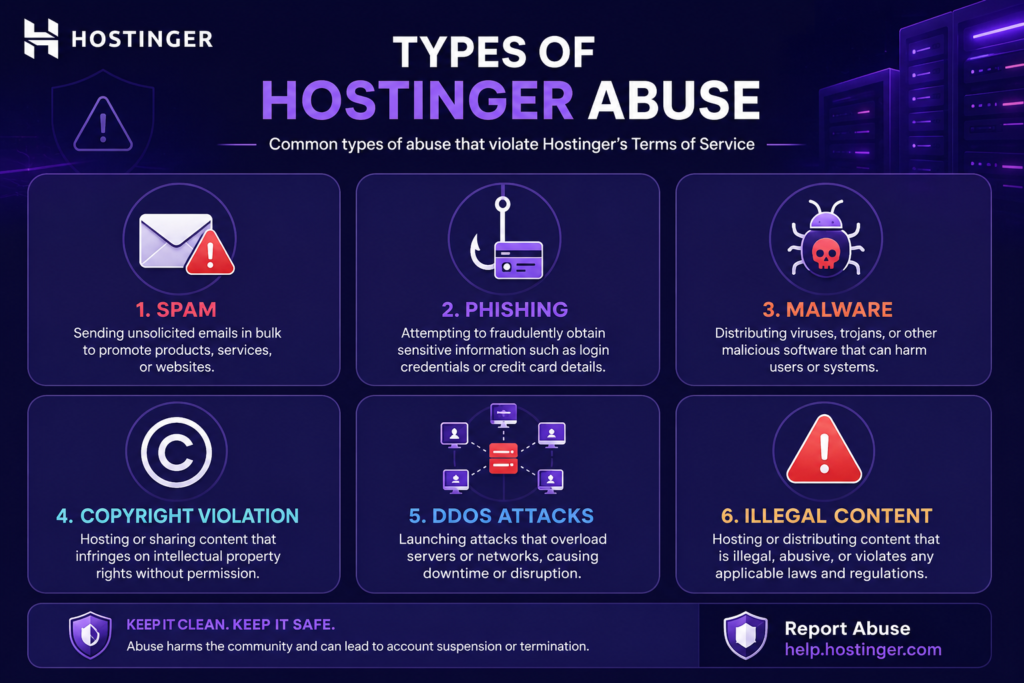
If you’ve received an abuse notice from Hostinger, or if you’ve been a victim of spam, phishing, or malware originating from a Hostinger-hosted website, you’re dealing with Hostinger abuse. This term covers any violation of Hostinger’s Acceptable Use Policy (AUP) or Terms of Service, including but not limited to:
- Sending spam or unsolicited emails
- Hosting phishing pages
- Distributing malware or viruses
- Copyright infringement (DMCA violations)
- DDoS attacks originating from your server
- Brute-force attacks against other sites
- Hosting illegal content
- Using excessive server resources that disrupt others
Hostinger, like all reputable hosting providers, takes abuse seriously. They have automated systems and a dedicated abuse team to detect and respond to violations. If you’re a Hostinger customer, understanding what constitutes abuse—and how to avoid it—is critical to keeping your site online.
If you’re a victim of abuse coming from a Hostinger IP, this guide will show you exactly how to report it and get action taken quickly.
If you’re looking for a reliable, fast web host for legitimate sites, get Hostinger at 80% off + free domain here: https://www.hostinger.com/in?REFERRALCODE=Rabi50]
Types of Hostinger Abuse (What Gets You Suspended)
Hostinger’s Terms of Service and Acceptable Use Policy are clear about prohibited activities. Here are the most common types of Hostinger abuse that lead to account suspension or termination.
1. Spam and Unsolicited Email
Sending bulk emails without proper opt-in, using purchased email lists, or running a spam bot can trigger immediate suspension. Even if you use a third-party email service, if the spam originates from your Hostinger server, you’re responsible.
Common triggers:
- Using a nulled or cracked email marketing script
- Sending email via PHP mail() in bulk
- Poorly secured contact forms being exploited
2. Phishing Pages
Hosting fake login pages (e.g., fake PayPal, bank, or social media logins) is a severe violation. Phishing sites are often uploaded after a WordPress site is hacked.
3. Malware Distribution
Hosting files that infect visitors’ computers, or using your account to distribute trojans, ransomware, or spyware, is illegal and leads to immediate termination.
4. Copyright Infringement (DMCA)
Hosting pirated software, movies, music, or copyrighted images without permission. Hostinger complies with DMCA takedown notices and will suspend repeat offenders.
5. DDoS Attacks
Using your server to launch Distributed Denial of Service attacks against other websites or networks. This often happens when a vulnerable script is exploited.
6. Brute-Force Attacks
Running scripts that attempt to guess passwords on other servers (e.g., WordPress admin panels) is considered abuse and will be flagged.
7. Illegal Content
Hosting content that is illegal in your jurisdiction or Hostinger’s jurisdiction, including child exploitation material, terrorist content, or fraud-related material.
8. Excessive Resource Usage
On shared hosting, using more than your fair share of CPU, memory, or I/O can be classified as abuse if it degrades service for other users. This often happens with poorly optimized scripts or runaway cron jobs.
9. Proxy or Tor Exit Nodes
Running open proxies, Tor exit nodes, or VPN services on shared hosting is prohibited and considered abuse.
10. Cryptocurrency Mining
Mining cryptocurrency on shared hosting is a violation and will trigger immediate suspension due to resource abuse.
How Hostinger Handles Abuse Reports
Hostinger has a structured abuse handling process. Here’s what happens when abuse is detected or reported.
Automated Detection
Hostinger uses automated monitoring systems that scan for:
- Spam signatures in outgoing email
- Malware patterns in hosted files
- Unusual network traffic (DDoS)
- Excessive resource usage
- Known phishing URLs
When a potential violation is detected, Hostinger may automatically suspend the account or place it in a limited mode.
Manual Review
Hostinger’s abuse team reviews reports from:
- Other hosting providers
- Security researchers
- Law enforcement
- DMCA takedown notices
- User complaints submitted via their abuse form
Suspension Process
If abuse is confirmed, Hostinger typically:
- Suspends the offending website/account (may be immediate for severe violations)
- Sends an email to the account holder explaining the violation
- Gives a deadline to remove the abusive content or fix the issue
- Requires a response confirming the issue is resolved
- Reactivates the account after verification (for first-time, non-severe offenses)
- Terminates the account for repeat or severe violations
Response Time
In my experience, Hostinger’s abuse team responds to valid reports within 24–48 hours. For severe issues like phishing or malware, action is often taken within hours.
Hostinger Abuse Contact
To report abuse originating from a Hostinger IP, email: abuse@hostinger.com or use their online abuse report form.
If you want a host with strong security and responsive support, choose Hostinger: https://www.hostinger.com/in?REFERRALCODE=Rabi50]
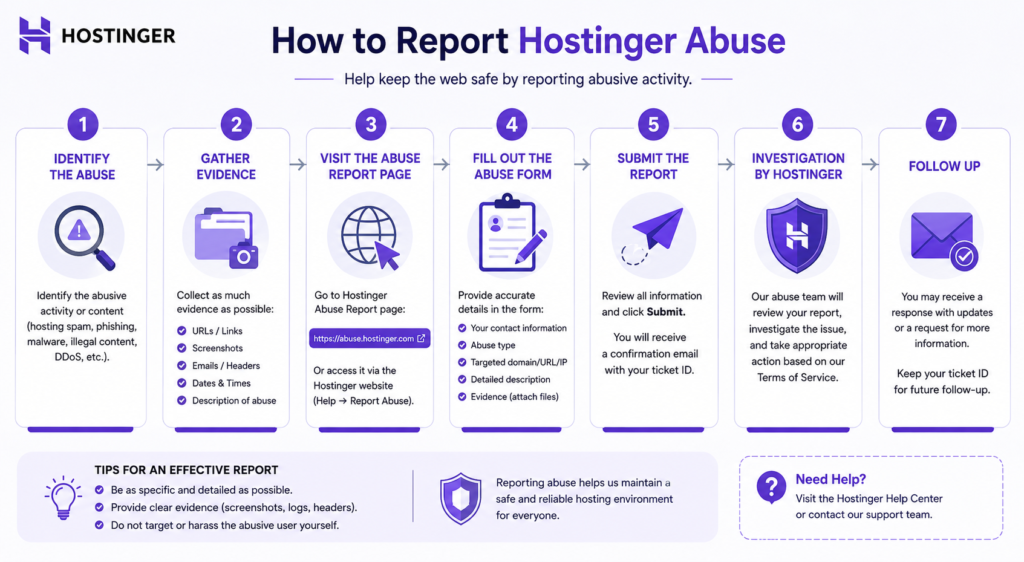
How to Report Hostinger Abuse (Step-by-Step)
If you’ve been a victim of spam, phishing, malware, or copyright infringement from a Hostinger-hosted site, follow these steps to report it.
Step 1: Gather Evidence
Collect as much information as possible:
- Full URL of the abusive content
- IP address of the offending server
- Email headers (for spam)
- Screenshots of the abuse
- Timestamps
- Your contact information
Step 2: Identify the Host
Confirm the offending site is hosted on Hostinger. Use tools like:
- whois.domaintools.com to check IP
- hostinger.com/ip to verify if IP belongs to Hostinger
Step 3: Submit a Report
Hostinger provides an abuse reporting form:
- Go to Hostinger’s website
- Navigate to “Contact” or “Report Abuse”
- Fill out the form with details
- Attach evidence if possible
- Submit
Alternatively, email abuse@hostinger.com with all details.
Step 4: Follow Up
If you don’t receive a response within 48 hours, follow up politely. Include your original report reference number if provided.
Step 5: Escalate if Necessary
If Hostinger doesn’t act, you can:
- Report to the domain registrar (if domain is registered with a different company)
- Contact law enforcement for illegal content
- Report to organizations like Spamhaus (for spam)
Important: Only report genuine abuse. False reports can result in your own account being flagged.
How to Prevent Your Hostinger Account from Being Flagged for Abuse
If you’re a Hostinger customer, the best way to avoid suspension is to prevent abuse from happening in the first place. Here’s my security checklist.
1. Keep All Software Updated
Outdated WordPress, plugins, and themes are the #1 cause of hacked sites used for abuse. Enable automatic updates wherever possible.
2. Use Strong Passwords and 2FA
Weak passwords are easily brute-forced. Use unique, complex passwords for:
- Hostinger account
- WordPress admin
- Email accounts
- Database
Enable two-factor authentication (2FA) on all accounts.
3. Secure Your WordPress Site
- Install a security plugin (Wordfence, Sucuri, or iThemes Security)
- Limit login attempts
- Change the default “admin” username
- Use HTTPS (free SSL from Hostinger)
- Disable file editing in WordPress
4. Protect Your Email
- Never send bulk email from shared hosting
- Use a dedicated email service (Mailchimp, SendGrid) for newsletters
- Secure contact forms with CAPTCHA
- Monitor outgoing email for anomalies
5. Regularly Scan for Malware
Use Hostinger’s built-in malware scanner (available on higher plans) or a third-party tool like Sucuri or Wordfence to scan weekly.
6. Monitor Resource Usage
Keep an eye on your CPU, memory, and I/O usage in hPanel. If you see spikes, investigate. Optimize slow queries, enable caching, and use a CDN.
7. Backup Your Site Regularly
Hostinger provides daily backups on Premium+ plans. Additionally, use a plugin like UpdraftPlus for off-site backups. If your site is hacked, you can restore quickly.
8. Avoid Nulled Themes and Plugins
Nulled (cracked) themes and plugins often contain malware. Always use legitimate, licensed software.
9. Be Careful with User-Generated Content
If you allow comments, file uploads, or user registrations, moderate them. Spammers often exploit these features.
10. Read Hostinger’s Acceptable Use Policy
Understand what is and isn’t allowed. Ignorance is not a defense.
Get Hostinger with free daily backups and security features: https://www.hostinger.com/in?REFERRALCODE=Rabi50
What to Do If Your Hostinger Account Is Suspended for Abuse
If you’ve received a suspension notice from Hostinger, don’t panic. Here’s the step-by-step process to appeal and get your site back.
Step 1: Read the Suspension Email Carefully
The email will explain:
- What type of abuse was detected
- When it was detected
- What action was taken (suspension, limitation)
- What you need to do to resolve it
Step 2: Identify the Source of Abuse
Check your site for:
- Malicious files (use a malware scanner)
- Unauthorized scripts
- Compromised plugins
- Spam-sending scripts
- Phishing pages
Common locations: /wp-content/uploads/, /tmp/, or hidden files in root.
Step 3: Remove the Abusive Content
Delete the malicious files, remove the phishing page, or fix the vulnerable script. If your site was hacked, you may need to:
- Change all passwords
- Update WordPress and plugins
- Reinstall core files
- Restore from a clean backup
Step 4: Respond to Hostinger
Reply to the suspension email or contact support via live chat. Include:
- Your account details
- Confirmation that the abuse has been removed
- Steps you’ve taken to prevent recurrence
- Request for reactivation
Step 5: Wait for Review
Hostinger will review your response and may ask for additional information. Response time is typically 24–48 hours.
Step 6: Prevent Future Abuse
After reactivation, implement the security measures listed above. A second violation may lead to permanent termination.
Important: If the abuse was severe (phishing, malware, illegal content), Hostinger may not reactivate your account, regardless of your explanation.
Hostinger Abuse vs Other Hosts: How Does It Compare?
Hostinger’s abuse handling is similar to other reputable hosts, but there are differences.
| Feature | Hostinger | Bluehost | SiteGround | Namecheap |
|---|---|---|---|---|
| Abuse team response | 24–48 hrs | 24–72 hrs | 12–24 hrs | 24–48 hrs |
| Automated detection | Yes | Yes | Yes | Yes |
| Suspension for spam | Yes (immediate) | Yes (immediate) | Yes (immediate) | Yes (immediate) |
| Phishing response | Hours | Hours | Hours | Hours |
| Appeal process | Email/live chat | Phone/chat | Ticket | Ticket/chat |
| Reactivation rate | High for first-time | Medium | Medium | Medium |
| Resource limits | Strict on shared | Moderate | Strict | Moderate |
Key takeaway: Hostinger’s abuse response is faster than Namecheap and comparable to Bluehost. SiteGround has the fastest response but is more expensive. Hostinger’s reactivation rate for first-time, non-severe offenses is high—they give users a chance to fix issues.
Hostinger Abuse: Frequently Asked Questions (FAQ)
1. What is Hostinger abuse?
Hostinger abuse refers to any violation of Hostinger’s Acceptable Use Policy, including spam, phishing, malware distribution, copyright infringement, DDoS attacks, and excessive resource usage. Such activities can lead to account suspension or termination.
2. How do I report abuse on Hostinger?
Email abuse@hostinger.com or use their online abuse report form. Include the full URL, IP address, evidence (screenshots, email headers), and your contact information. Hostinger responds within 24–48 hours.
3. Why did Hostinger suspend my account for abuse?
Common reasons include sending spam, hosting phishing pages, distributing malware, copyright violations, DDoS attacks, or excessive resource usage. The suspension email will specify the exact reason.
4. Can I appeal a Hostinger abuse suspension?
Yes. Respond to the suspension email or contact live chat. Remove the abusive content, explain the steps you’ve taken to prevent recurrence, and request reactivation. Hostinger usually reactivates first-time, non-severe violations after verification.
5. How long does Hostinger take to respond to abuse reports?
In my experience, Hostinger’s abuse team responds to valid reports within 24–48 hours. For severe issues like phishing or malware, action is often taken within hours.
6. Does Hostinger terminate accounts for abuse?
Yes. For severe or repeat violations (phishing, malware, illegal content), Hostinger may permanently terminate the account without possibility of reactivation.
7. Can Hostinger detect abuse automatically?
Yes. Hostinger uses automated systems to detect spam signatures, malware patterns, unusual network traffic, and excessive resource usage. Automatic suspension may occur before manual review.
8. What should I do if my WordPress site is hacked and used for abuse?
Immediately change all passwords, update WordPress and plugins, remove malicious files, and restore from a clean backup. Contact Hostinger support to report the hack and request guidance.
9. Is Hostinger strict about resource usage?
Yes. On shared hosting, excessive CPU, memory, or I/O usage that affects other users is considered abuse and can lead to suspension. Optimize your site with caching and a CDN to avoid this.
10. How can I prevent Hostinger abuse on my account?
Keep software updated, use strong passwords and 2FA, secure WordPress, use a dedicated email service for newsletters, regularly scan for malware, and monitor resource usage. Follow the security checklist in this guide.
Final Verdict: Hostinger Abuse Handling Is Fair but Strict
Hostinger takes abuse seriously—and that’s a good thing. It means their servers are less likely to be blacklisted, which benefits all legitimate customers. If you’re a victim of abuse from a Hostinger IP, their reporting process is straightforward and responsive. If you’re a Hostinger customer, the key is prevention: keep your site secure, avoid spam, and monitor resource usage.
In my 7+ years of experience, Hostinger’s abuse team is fair. They give first-time offenders a chance to fix issues, unlike some hosts that terminate immediately. But they are strict with severe violations like phishing and malware, which is exactly what you want in a hosting provider.
If you’re looking for a reliable, secure, and affordable host, Hostinger remains one of my top recommendations. Just make sure you use it responsibly.
Get Hostinger at 80% off + free domain + free SSL: https://www.hostinger.com/in?REFERRALCODE=Rabi50
Disclosure: This post contains affiliate links. If you purchase through them, I may earn a commission at no extra cost to you. I only recommend products I have tested and would use myself.